


Switch Accounts and Sites From the Top of Any Page
If you manage a lot of sites, getting from one to the next meant going back to your Sites page and clicking in again. Now you can switch from the page you’re on.
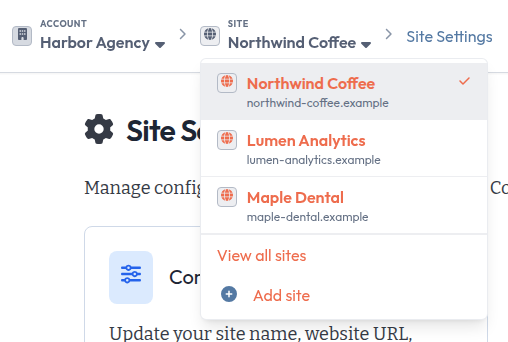
Two switchers, top left
The top of every page inside a site now starts with two labeled names: Account and Site. Click either name to open a list. The one you’re in has a check next to it.
Change sites without losing your place
The Site list shows the sites in your current account, each with its URL. Pick one and you stay on the same page for that site. If you’re in Site Settings for one client, you land in Site Settings for the next.
Some pages belong to one item inside a site, like a single question or one subreddit. Those can’t carry over, so you land on the new site’s Overview instead.
The list shows your current site first, then up to seven more by name. For the rest, click View all sites and search by name or URL. Add site is right below it.
Change accounts
If you belong to more than one account, click the name under Account to see them all. Pick one to open its Sites page. View All Accounts is at the bottom of the list. If you have one account, its name links straight to it.
On smaller screens
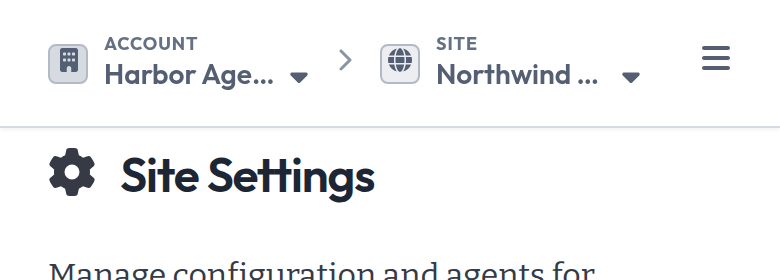
Both switchers stay at the top on smaller screens. On pages inside a site, the page name hides to make room.
See What are Sites? for more on how sites work in an account.