


System Settings and AI Search: How Hidden Configurations Control Results
Understanding how AI system settings like temperature, top-p, and grounding affect search results and brand visibility. Learn what these hidden configurations mean for optimization.
What are system settings in AI search?
Think of AI system settings as the hidden controls that shape how an AI service answers you. These settings can change in an instant. AI companies constantly adjust them for their public tools.
They’re different from the AI model itself, which costs a lot to update. They’re also not the same as “system prompts,” which are secret instructions. Instead, system settings are technical dials that fundamentally steer the AI’s behavior.
Here’s the catch: System settings can make AI search results unpredictable. They can change quickly and drastically affect which brands show up. This happens even if the AI model or your content stays the same.
The hidden settings controlling AI responses
Take a look at this screenshot from Google’s AI Studio for Gemini. It shows all the settings you can tweak:
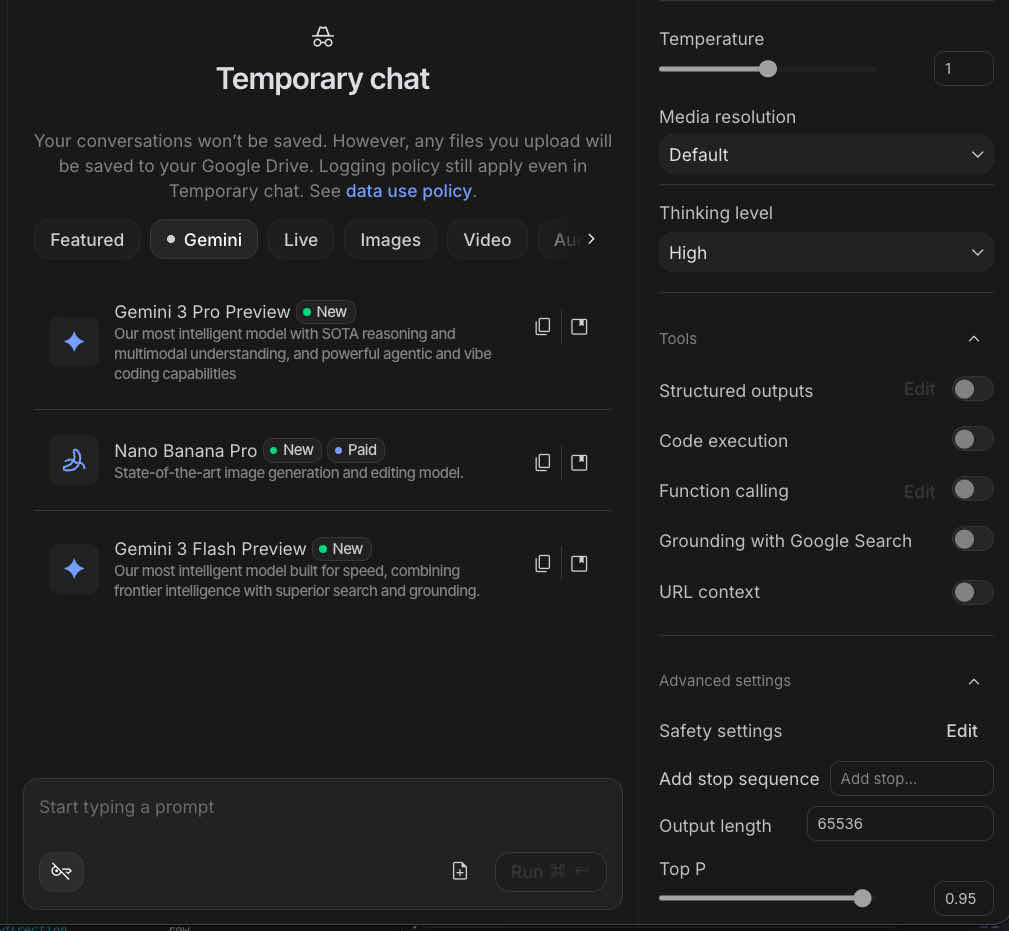
Keep in mind, not every AI system or model uses all these settings. Some might call them by different names, even if they do the same thing. The main takeaway is this: a lot of hidden controls are at play behind the scenes.
Key system settings and what they do
Temperature
This setting decides how random or creative the AI’s answers will be. A lower “temperature” makes the AI’s responses more predictable and focused. A higher “temperature” means more variety and creativity.
How it affects your brand: If the temperature is high, your brand might appear one day and disappear the next, even if the search query is the same. This creates more variation in brand mentions.
Media resolution
This sets the quality of any images or other visual content the AI creates. Better quality means more detail, but it can also make responses slower or cost more.
Thinking level
This controls how much the AI “thinks” or processes information before giving an answer. More “thinking” helps with complex questions and planning, but it also slows things down.
How it affects your brand: If the AI thinks more deeply, it might compare brands in a more detailed way. This means it looks beyond just keywords to decide which brands to mention.
Structured outputs
This makes the AI’s answers follow a specific format, like JSON. It’s helpful when you need predictable results that computers can easily read.
Code execution
This lets the AI run computer code while it’s creating a response. It’s great for doing calculations, analyzing data, or checking facts with programming.
Function calling
This allows the AI to use specific, pre-built functions. It’s often used to connect the AI with other programs or online services.
Grounding with Google Search
This feature lets the AI use current Google Search results to make sure its answers are accurate and up-to-date. This is especially useful for recent news or facts.
How it affects your brand: When grounding is on, traditional SEO becomes super important. The AI pulls information straight from live search results. If grounding is off, only the data the AI was trained on matters for your brand’s visibility.
URL context
This allows the AI to read and use content from specific web pages you give it. It’s handy for summarizing, analyzing, or linking to outside information.
Safety settings
These settings manage content moderation and how much risk the AI takes. Changing them affects how strictly the AI filters or rewords sensitive content.
How it affects your brand: If safety settings are strict, your brand might be left out if it’s even slightly connected to controversial subjects.
Add stop sequence
This tells the AI to stop writing when it hits a certain word or phrase. It helps cut off responses at a specific point.
Output length
This sets the maximum length of the AI’s answer. Longer answers use more computing power.
How it affects your brand: If the output is short, fewer brands get mentioned. If your brand isn’t among the first few, the AI might cut it off before it even gets to you.
Top P (nucleus sampling)
This setting works a bit like “temperature.” It narrows down the AI’s word choices to only the most likely ones, up to a certain probability. Lower values make responses more focused. Higher values add more variety.
How it affects your brand: Like with temperature, a higher “Top P” means more variation in which brands the AI mentions.
The same model, different settings, different results
Look at this friendly holiday greeting from Gemini:

This Gemini example uses the exact same AI model as the one in AI Studio. But because it’s a public service, Google picks what it thinks are good default settings.
This shows you how the same AI model, with the same training data, can give totally different answers. The only difference is how the settings are configured.
Why AI services constantly adjust settings
All AI services regularly fine-tune these settings for their public tools. They do this to strike a balance between several factors.
First, they consider their business needs. For example, higher “temperature” and longer answers cost more money. How fast the AI responds depends on its “thinking level.” And “safety settings” protect their brand reputation.
Second, they aim for quality answers. This involves balancing accuracy with creativity, deciding how much “grounding” to use, and how much variety users expect.
Finally, they focus on user experience. They want the response length to feel right and the detail level to suit the interface. They also aim for a good mix of surprising and predictable answers.
What this means for AI search optimization
Knowing about system settings helps you understand why AI search results can be so unpredictable.
High-temperature services will be more unpredictable. If an AI service uses high “temperature” or “Top P” settings, expect more ups and downs in brand mentions. Your goal should be to get mentioned often enough so that these variations don’t harm your visibility.
Grounding changes everything. When “grounding with search” is turned on, traditional SEO becomes incredibly important. The AI pulls from live search results. But when it’s off, only the AI’s training data matters. Services might turn this feature on or off depending on the type of search query.
Output length controls who gets seen. If your brand isn’t among the top few, you might get cut off by limits on how long the AI’s answer can be. Aim to be mentioned early in the responses.
Safety settings can unexpectedly filter you out. If your brand deals with sensitive topics, like health, finance, or politics, stricter safety settings might exclude you, even if your content is relevant.
The settings you can’t see or control
The tricky part about system settings is that:
They are hidden. AI services don’t share what their settings are.
They change all the time. Settings can be tweaked daily, or even for each individual search.
They differ by what you’re asking. The same AI service might use different settings for different kinds of questions.
You have no control over them. Unlike system prompts, which sometimes get leaked, or models, where you know their training cutoff dates, these settings are completely secret.
This means your optimization strategy needs to be strong enough to handle these setting changes. Focus on: * Getting mentioned consistently across many different sources. This helps no matter what the “temperature” settings are. * Having strong traditional SEO. This is key when “grounding” is turned on. * Making your brand’s message clear and easy to understand. This helps when the AI has limited output length. * Creating authoritative, safe content. This is important no matter what the safety settings are.
Tracking settings changes
You can’t see these settings directly, but you can spot clues when they change.
If results suddenly become more unpredictable, it could mean: * The “temperature” or “Top P” went up. * “Grounding” was turned on or off. * The output length was cut down.
If results change consistently over time, it might mean: * Safety settings were adjusted. * The “thinking level” changed. * “Grounding” was turned on or off.
If different users get different results, it could suggest: * Personalization settings are active. * The AI service is testing different configurations. * The “context window size” has changed.
Moving forward
System settings add a layer of unpredictability that’s out of your hands. But knowing how they operate helps you: * Guess why search results might shift. * Create optimization plans that can handle different settings. * Figure out which changes are important and which are just random noise. * Stick to basic strategies that work no matter what the settings are.
Related guides: - Learn about another source of volatility → System Prompts and AI Search SEO - Understand the full picture → AI Search Ranking Fluctuations - Start optimizing → B.I.S.C.U.I.T. Framework