


Search Volume Now Available for Research Questions
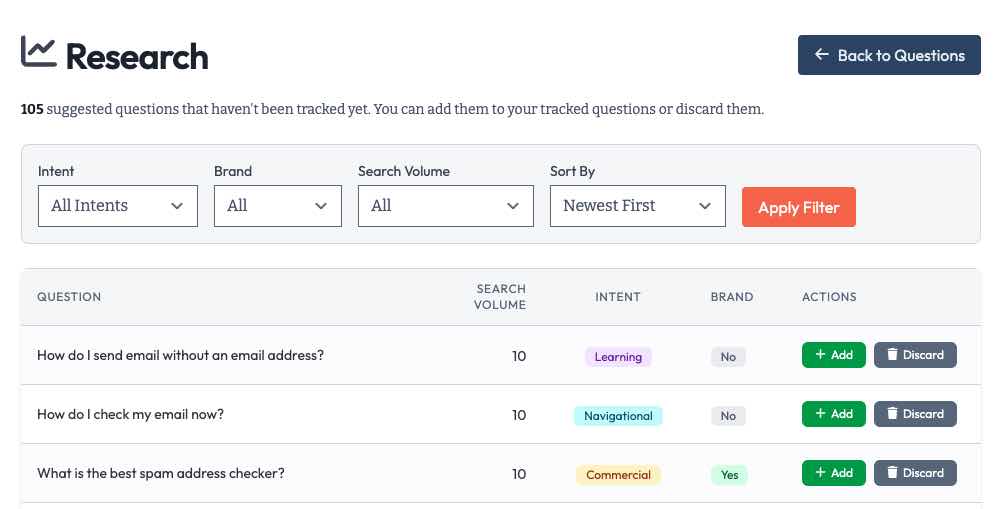
The Research page now displays search volume data and gives you filters to find the questions that matter most.
What’s New
We’ve added several improvements to the Suggested Questions view:
- Every suggested question now shows its monthly search volume, so you can prioritize high-traffic opportunities.
- Narrow down suggestions by Intent (informational, transactional, etc.), Brand (branded vs. non-branded), and Search Volume ranges (high, medium, low).
- Reorder your list by Volume, Intent, Brand, or Question Name to find exactly what you need.
- The page description updates to show how many questions match your current filters.
Deep Links from Keyword Audit
The Keyword Audit page now links directly to filtered Research views. Click on any intent type or brand category in your audit, and you’ll jump straight to suggested questions matching that criteria. This makes it simple to fill gaps identified in your keyword analysis.
Getting Started
Head to any topic, click “Research” in the sidebar, then “Suggested Questions.” You’ll see the new search volume column and filter dropdowns at the top of the page. Start filtering to find your next high-value questions to track.
Learn More
- Search Volume in AI Search - Understanding search volume patterns in AI-powered search
- What Questions Should You Track? - Strategies for building your question portfolio
- Keyword Discovery - How Knowatoa helps you find high-value keywords