

Google Sheets
Knowatoa exports your AI search visibility data directly to Google Sheets, making it easy to build custom reports, create pivot tables, and share insights with your team.
Why This Matters for AI Search Marketing
Collaborative analysis accelerates insights. Google Sheets brings AI search data to where your team already works.
Real-Time Collaboration
Multiple team members can analyze, annotate, and discuss AI search data simultaneously in familiar tools.
Custom Analysis Power
Build pivot tables, create custom metrics, and apply formulas tailored to your specific business questions.
Instant Sharing
Share insights with stakeholders immediately using Google's built-in sharing controls and permissions.
Part of Your Data Stack
Google Sheets connects Knowatoa data to your existing workflows and tools.
Spreadsheet Power for AI Search Data
Google Sheets integration brings your AI search data into the collaborative spreadsheet environment your team already knows.
Team Collaboration
Share live-updating data with team members. Multiple people can view and analyze simultaneously.
Custom Calculations
Apply your own formulas, create calculated fields, and build custom metrics that matter to your business.
Pivot Tables & Charts
Use Sheets' built-in analysis tools to create pivot tables, charts, and visualizations instantly.
Combine Data Sources
Merge AI search data with other business metrics from different sources in one spreadsheet.
Easy Sharing
Share with specific people or generate view-only links for clients and stakeholders.
Version History
Access previous versions of your data. Never lose historical snapshots of your AI search performance.
How Google Sheets Export Works
Get your AI search data into Google Sheets in just a few clicks.
Select Your Data
Choose which metrics to export: visibility scores, rankings, mentions, citations, or competitor data.
Choose Export Options
Select date range, AI platforms, and specific topics to include in your export.
Export to Sheets
Click export and your data opens in a new Google Sheet, ready for analysis and sharing.
Analyze & Share
Add formulas, create charts, share with team members, or export further to other formats.
AI Search Visibility Data
| Question | Platform | Visibility | Rank |
|---|---|---|---|
| Best CRM software | ChatGPT | 85% | #2 |
| Best CRM software | Claude | 92% | #1 |
| CRM comparison | Perplexity | 68% | #4 |
More Data Integration Options
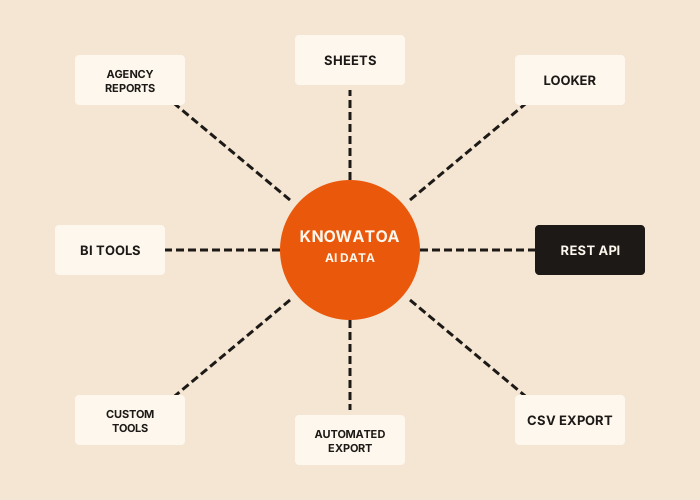
Google Sheets is one of several ways to work with your Knowatoa data.
Looker Studio
Build interactive dashboards with AI search and other marketing data.
CSV Export
Download data for offline analysis in Excel or any spreadsheet tool.
API Access
Full programmatic access for custom integrations and automation.
Automated CSV Export
Schedule automatic exports delivered to your inbox on a regular schedule.
NinjaCat
Unified agency reporting combining AI search with all marketing channels.
Team Collaboration
Invite team members and share dashboards directly within Knowatoa.
Related Guides
In-depth information and how-to guides on getting the most out of Knowatoa and your search marketing.


What Marketers Are Saying
Hear from marketing leaders who use Knowatoa to track their AI search visibility.
"Knowatoa revealed insights that completely changed how I think about brand, website, and content distribution. It's not just a tool, it's a smarter way to approach visibility."

CEO, Castos
"Knowatoa helps businesses navigate the evolving landscape of AI, content strategy, and search visibility, and how to stay competitive in this new era of rapid AI-driven changes in marketing."

Founder, Core Group
Why Knowatoa
Spreadsheets are powerful, but only if the data is good. Knowatoa feeds Google Sheets with clean, normalized data from all seven AI platforms, plus recommendations your team can act on immediately.
Recommendations Alongside Data
Exports include actionable recommendations in additional columns, so you can analyze data and next steps together.
Real Query Results
Every row contains actual AI responses from real queries, not simulations or modeled estimates.
All 7 Platforms in One Sheet
Compare ChatGPT, Claude, Perplexity, Gemini, Meta AI, Copilot, and SearchGPT data side by side.
Historical Data Included
Export any date range for trend analysis. Track visibility changes over days, weeks, or months.
Analyze AI Search Data in Sheets
Export your visibility data to Google Sheets and collaborate with your team using familiar tools.